
Buy Note
Just take a note whenever you notice what you have to buy next!
Once you save items, it will be automatically saved on a history so that you can make a list from the history next time very easily!
You don't need to retype the same item again!
BuyNote shows you what you have to buy in the list of the calendar unless you tick the items!
So you will never forget to buy something!BuyNote User Guide
*Initial Window*The initial window is the calendar.
A button of number 7 of the right-corner of the calendar is to switch the display from monthly to weekly.
*Buttons of the calendar (from the left)*1) Add button: Select the date and tap this button to move to "Enter List" window.2) Today button: Go back to today's date.3) Left&Right button: Move the date right to left.4) List button: You can see the list of saved items.----Shopping bucket button of the list-----You can make a new shopping list by tapping each shopping bucket.
----Menu button of the list-----When you see the list, press menu button then press Search.
You can search items by keywords.--------------------------------------------5) Note button: Press this button when you take a note or memo.-----Buttons of Note window-------a) Search button: Search note by keywords.b) AtoZ button: Switch the display by alphabet.c) Date button: Switch the display by date.d) Add button: Make a new note or memo.----------------------------------------------------6) Calc button: Display the calculator.
*Menu buttons of the calendar window( initial window )*1) Setting: Customize the calendar.2) Password: Set a password.3) Backup: Save data to SD card.4) Setting Mark: Customize mark list by tapping each mark you want.
You can shorten mark list.5) Mark: Add mark to the date.-----How to add marks on the calendar----Select a mark you like.
> Tap the date to add the mark.-----How to delete the marks-----Select the same mark.
> Tap the date where the same mark is displayed.
6) Exit button: Exit app.
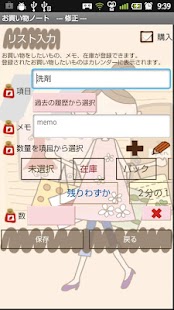
*Make a shopping list!*1) Tap Add button of the calendar.
---Enter List Window----a) Category: Enter item that you want to buy.b) Select from the history of past: When you have already saved the same items before, tap this button.
The list of saved items will be displayed.
Tap an item you want to add to the list.c) Memo: Take a memo.d) Select quantity from categories: Instead of typing the number, you can select quantities from those list.
You can customize your own categories as well.
Plus button is Add button.
You can create a new category.
Pencil button is Edit button.
Edit the category and make a new.e): Quantity: Press this button to type the number of the item.f) Delete button: Delete the item.g)Add button (bottom of the window): Save the item and continue to make a list without moving the window!
h) Back button: Go back to the calendar.
*When you go shopping*You can see the saved items in the list of the calendar window.
Tap one of those then move to the List window.
When you buy the item, tick the checkbox!----Email button of the list window----Email: You can send the list to your family member!------------------------------------------------------------------------Press Back button of the mobile to save and go back to the calendar.
Ticked items will be disappeared from the next day but data is saved in the history of past purchase.Tick mark will be appeared when you buy and tick items.Saved items will be in the list of the calendar unless you buy and tick the items so you won't forget to buy something!
About Buy Note
- Package name (App ID)
- info.androidx.buycalen
- Available on
- Google Play
- Price
- Free
- Version
- v1.0.29
- Updated
- May 2, 2015
- Developer
- GalleryApp
Looking for the Buy Note APK?
The safest way to get Buy Note (info.androidx.buycalen) on your Android device is to install it directly from Google Play — you'll always get the latest official version, automatic updates, and no risk of modified or infected APK files from third-party sites.
Gaming Features
Enjoy immersive gaming experience with various game modes.
Productivity Tools
Boost your productivity with powerful tools and features.
Financial Tools
Manage your finances and track your expenses easily.
See Buy Note in Action

Frequently Asked Questions
Is Buy Note free?
Yes, Buy Note is free to download and install on Android through Google Play.
How do I install Buy Note on Android?
Open Google Play on your Android phone or tablet, search for Buy Note by GalleryApp or tap the Google Play button on this page, then tap Install. The app downloads and installs automatically.
What is info.androidx.buycalen?
info.androidx.buycalen is the App ID (package name) of Buy Note on Google Play. Every Android app has a unique package name, and it is the safest way to verify you are installing the official app.
Is Buy Note safe to download?
Installing Buy Note from Google Play is the safest option: you get the official version published by GalleryApp, verified by Google Play Protect, with automatic updates. Avoid APK files from unofficial third-party sites.

Get Buy Note Today
Buy Note for Android — free download on Google Play.
Compatible with Android phones and tablets — available on Google Play.
Ask AI about this app
Get instant answers about features, tips and more from popular AI assistants.